

Written by Josh Hutter
Originally published December 2022 • Updated March 2026
SubIDs are one of the most powerful — and often underused — tools in affiliate marketing. By adding a simple tracking parameter to your affiliate links, you can identify exactly where your traffic is coming from, which placements are driving conversions, and how to optimize your campaigns for better performance.
In this guide, we’ll explain what a SubID is, how it works, and how you can use it to gain deeper insights into your affiliate traffic.
What is a SubID in Affiliate Marketing?
A SubID (sub-identifier) is a customizable tracking parameter that can be appended to an affiliate link. It allows publishers and marketers to pass additional information through the link, helping them track traffic sources, campaigns, or specific placements.
Think of a SubID as a label attached to your affiliate link. When a user clicks that link and converts, the SubID is passed back in reporting—giving you visibility into what drove that action.
Why SubIDs Matter for Affiliate Tracking
Without SubIds, you may know that a click or conversion happend, but now where it came from.
Using SubIDS allows you to:
- Track performance across different traffic sources
- Identify top-performing placements (emails, blog posts, social posts, etc.)
- Optimize campaigns based on real data
- Run A/B tests on links and creatives
- Improve ROI by focusing on what converts
For publishers managing multiple campaigns or channels, SubIDs are essential for making informed, data-driven decisions.
SubID Link Structure within FMTC
The parameter for SubID within the FMTC platform is “sid”.
&sid=
?sid=
You must add a “?” if no other parameter is included in front of the SubID parameter; if there is another parameter, you need to add “&” instead.

The fmtc.co link below is an example of a “?” link, as there are no other parameters aside from SubID. The FreshReach® link shows the SubID as an additional parameter after “c=deal-code” and therefore uses an “&”.

The parameter is available on all fmtc.co shortlinks as well as FMTC’s FreshReach® links.
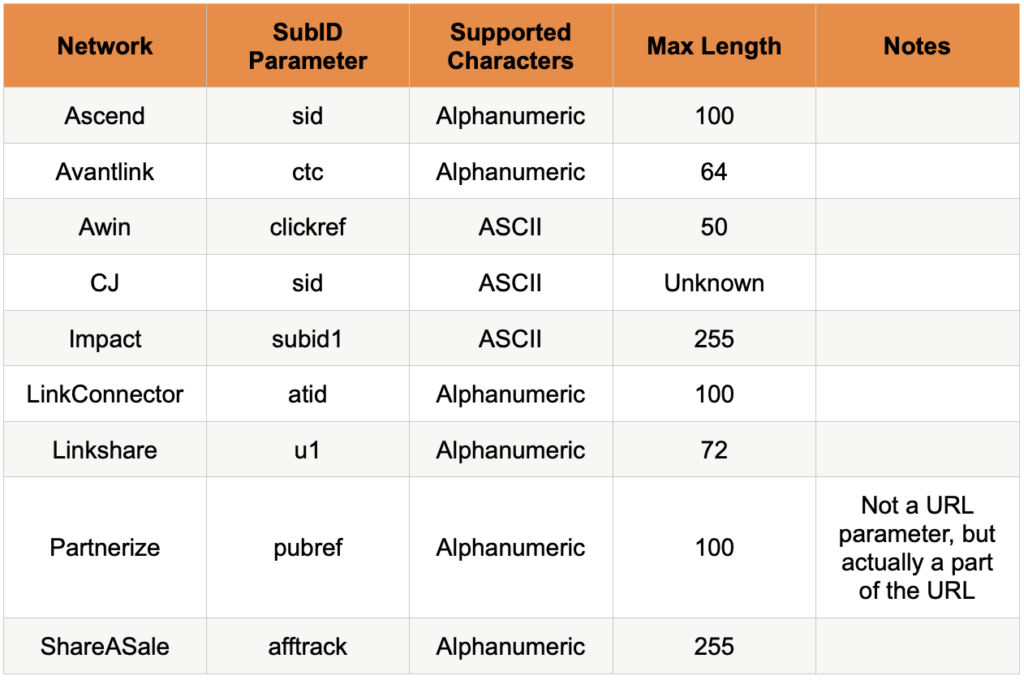
Network SubID Parameters
Most networks support the SubID parameter, although each network handles it differently. FMTC normalizes and standardizes the SubID to ensure that it is properly passed through all your links. Each affiliate network has unique SubID parameters. The following table will show you how they are handled with other network monetization platforms:
Passing SubIDs Through FMTC
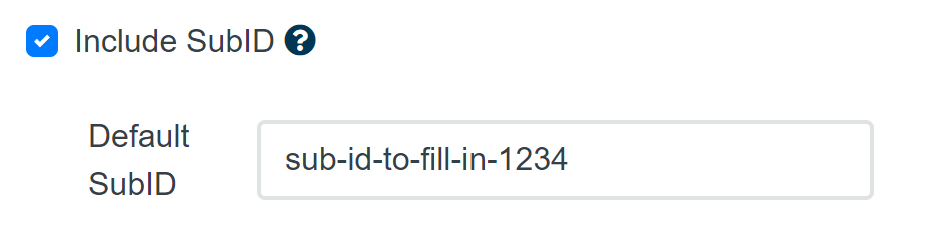
FMTC does not pass the SubID by default; this setting needs to be turned on through the FMTC Deal Feed Settings. This will fill out the SubID parameter with the default SubID field to all the deals that are associated with the account.
In addition, if the merchant supports deep linking, you can add a unique SubID to each new link you generate. This can be found on an individual merchant page through FMTC’s Program Directory.
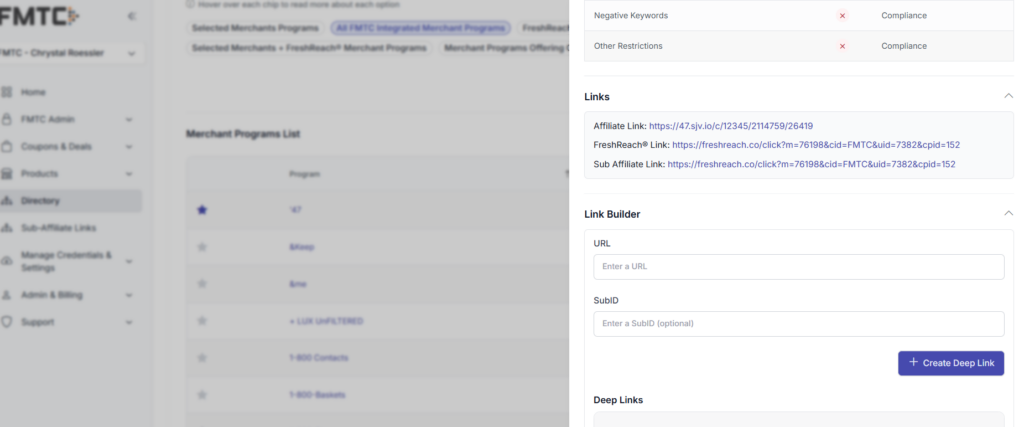
To pass the SubID, add the parameter at the end of the affiliate link, and it will be recorded and passed through the link. To properly add a URL parameter, you must add either the “?” or “&” symbol (depending on if it is the first parameter or not in the URL) followed by the name of the parameter, which in FMTC’s case will be “sid.” You can then set that value of your choosing so you can locate and track it later.
SubIDs are an additional way to enhance the tracking of your promotional links through the URL parameters. Attributing specific link locations to revenue sources allows you to make informed business decisions.
As always, our team is ready to help you! If you have any questions or concerns, feel free to contact your account manager or email us at support@fmtc.co. Curious about other FMTC technologies? Find more information on FMTC’s tools in Tech Corner:
- FMTC Tech Corner: getDeals Deep Dive
- FMTC Tech Corner: getMerchants Deep Dive
- FMTC Tech Corner: Get Deals and Get Merchants
- FMTC Tech Corner: Deal Types and the getTypes API
- FMTC Tech Corner: getNetworks
- FMTC Tech Corner: getLogos
- FMTC Tech Corner: The Product Feed
The post SubID Tracking Explained: How to Use SubIDs in Affiliate Links (FMTC Guide) appeared first on FMTC.





Last Comments